 savingsspot.co.uk
 That sickening, razor-thin ‘clack’ of toughened glass meeting British tarmac is a modern rite of passage. You pick your smartphone up, turning it over with the slow reluctance of a gambler checking a losing betting slip, and there it is: a glowing, multi-coloured spiderweb. In the UK alone, consumers smash upwards of 15 million mobile and tablet screens every single year. Yet, the moment you decide to get it fixed, you step into one of the most wildly unregulated, opaque retail sectors in the country.
Walk down any high street from Aberdeen to Southampton, and you will see three different shops offering to carry out a screen replacement on the exact same device for £45, £90, and £210 respectively. They will all look you in the eye and promise “original quality.” Mathematically, two of them are stretching the truth to its absolute breaking point. If you want to avoid turning a £100 accident into a £400 write-off, you need to understand the anatomy of the glass in your pocket.
The Illusion of “Just the Glass”
To understand why screen replacement pricing feels like a dark art, we have to dismantle the most common misconception in consumer electronics: the idea that you have “just cracked the front glass.”
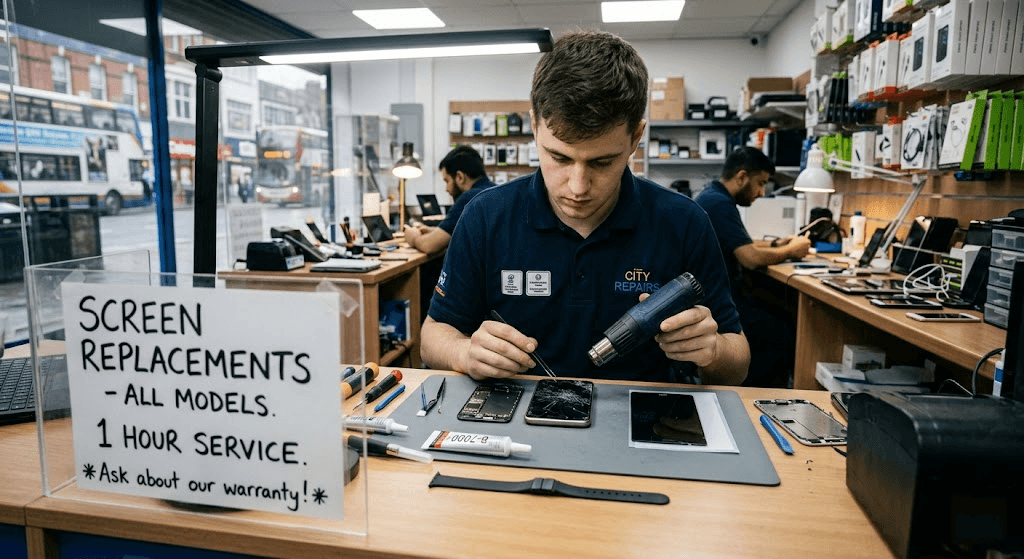
A decade ago, on an iPhone 3GS or an early Samsung Galaxy, the front glass and the visual display underneath were two entirely separate components. If you dropped it, a technician took a heat gun, pried the shattered glass off like a tough sticker, dropped a £5 piece of fresh glass onto the chassis, and charged you twenty quid. Those days are completely dead.
A modern smartphone display is an ultra-thin, optically bonded multi-layered sandwich. From the outside in, it consists of:
- The Oleophobic Coating: A microscopic oil-repellent layer that stops your fingerprints turning the screen into a greasy smudge.
- The Aluminosilicate Glass: (Often branded as Corning Gorilla Glass or Apple’s Ceramic Shield), designed to resist shattering.
- The Digitiser: A microscopic mesh of transparent wires that reads the electrical capacitance of your fingertips to register a ‘touch’.
- The Display Panel itself: Either a Liquid Crystal Display (LCD) or an Organic Light-Emitting Diode (OLED) paper-thin sheet that actually creates the image.
Because these layers are glued together at the factory using a liquid optically clear adhesive (LOCA) under intense vacuum pressure, they are functionally one solid object. When you crack the glass, the whole sandwich has to go. While there are specialist industrial labs in the UK that perform “glass-only refurbishment” using liquid nitrogen to freeze and cleave the broken glass away from a healthy OLED panel, your local corner repair shop is not doing this; they are buying a pre-assembled sandwich and swapping the whole unit out.
The Three Tiers of Repair: Choose Your Poison
When your screen dies, the UK market offers you three distinct avenues. Knowing which one to take depends entirely on your budget, your data security paranoia, and how long you intend to keep the phone.
Tier 1: The Official Manufacturer Route
Taking your phone to an Apple Store, a Samsung Experience Store, or sending it to a Google-authorised repair hub is the gold standard. You get a genuine part, your remaining factory warranty stays intact, and the phone’s water-resistance rating is officially re-certified.
The Catch: The price is frequently eye-watering—often sitting at 40% to 50% of the cost of buying the device brand new. Furthermore, official repairers operate under draconian data policies. If you haven’t backed up your phone to the cloud before handing it over, there is a very high probability they will factory reset the device as standard protocol before handing it back to you.
Tier 2: The High-Street Independent
This is the domain of the flashing neon “PHONE REPAIR” signs. They are fast, they will usually do the job in under an hour, they will not wipe your data, and they are significantly cheaper than Tier 1.
The Catch: You are playing the “Quality Lottery.” Because the word genuine is used with reckless abandon on the high street, you have to interrogate the technician using specific industry terminology before handing your device over (more on this below).
Tier 3: The DIY Route
Thanks to the growing Right to Repair movement and companies like iFixit, ordering a screen replacement kit to your home has never been easier. For the technically minded, spending a Sunday afternoon with a set of blue plastic prying spudgers and a magnetic screw mat is immensely satisfying.
The Catch: Modern smartphones are held together by industrial adhesives that require precise, sustained heat to soften. One slip of a metal pick inside the chassis can sever the paper-thin ribbon cable of the biometric sensor, or worse, puncture the lithium-ion battery, triggering a thermal runaway fire on your kitchen table.
The Hidden Traps of Aftermarket Screens
If you opt for an independent repair shop, the price they quote you will correspond directly to the grade of the aftermarket screen they pull out of their stockroom. If you do not ask what “grade” of screen they are using, you will almost certainly be given the cheapest option, marked up to the price of the standard option.
When looking at third-party screens, ask the technician which of these four categories the replacement falls into:
1. Refurbished Original (The Best Value)
This is a genuine Apple or Samsung OLED panel salvaged from a phone that had a cracked screen, which was sent to a clean-room facility to have new top-glass professionally bonded to it. You get 100% original colour accuracy, original touch sensitivity, and genuine refresh rates.
2. Soft OLED (The Smart Compromise)
Third-party manufacturers build these displays on a flexible plastic substrate, exactly like the original manufacturers do. They flex slightly inside the chassis when the phone is dropped, meaning they absorb shock brilliantly. The colours are roughly 90% as vibrant as an original screen, but it will survive normal daily bumps.
3. Hard OLED (The Sucker’s Bet)
To cut costs, Chinese aftermarket factories build these OLED displays on a rigid, hard glass substrate instead of a flexible one. Because the display itself cannot flex, the very next time you drop your phone—even onto a soft carpet—the outer glass might survive, but the rigid OLED panel underneath will snap in half, leaving you with a pitch-black screen and a second repair bill.
4. The “In-Cell” LCD Trap (The Absolute Worst)
This is the dirtiest trick in the UK mobile repair trade. Many modern phones (like the iPhone 12, 13, and 14 series) were engineered specifically for thin OLED screens. Dishonest or ultra-cheap shops will fit an In-Cell LCD panel into these phones. Because LCDs require a bulky backlight panel sitting behind them, the screen is physically thicker. It will sit proud of your phone’s metal frame. Worse still, because the phone’s motherboard is trying to push power to an OLED, the mis-matched LCD will cause your battery life to plummet by up to 30% and cause the handset to run noticeably hot.
Four Things That Break When Your Screen is Replaced
Even if a technician uses a pristine, top-tier screen, the act of opening a modern smartphone sets off a cascade of software and hardware tripwires that you need to be prepared for.
The Loss of ‘True Tone’ and Auto-Brightness
Apple devices feature an ambient light system called True Tone that warms or cools the display’s white balance based on the room you are standing in. Every single iPhone screen has a tiny, unique microchip soldered to it containing a serial number paired to the phone’s main processor. If a repair shop takes a brand-new, 100% genuine screen off another iPhone and puts it onto yours, the processor notices the serial numbers don’t match and permanently disables True Tone.
The Pro-Tip: A high-end independent shop will own an EEPROM Programmer (often a small blue box made by a company called QianLi). They plug your broken screen into it, download its serial code, plug the new screen in, and flash the original code onto it. Ask the shop: “Do you program the True Tone data over?” If they look at you blankly, walk out.
Goodbye IP68 Waterproofing
When your phone leaves the factory, it is sealed with a custom-cut, heat-activated synthetic rubber gasket. When a technician opens the phone, that seal is destroyed. While reputable shops will lay down a new, model-specific adhesive stencil before clamping the new screen down, it will never achieve a true factory pressure seal again. Treat any repaired phone as strictly rain-proof, not submersion-proof.
The “Important Display Message”
If you own an iPhone 11 or newer, replacing the screen outside of Apple’s official network will trigger a persistent, un-deletable notification on your lock screen for 4 days, and inside your Settings app forever, reading: “Unable to verify this iPhone has a genuine Apple display.” It does not affect the operation of the phone, but it will instantly knock £50 off the resale value when you try to trade it in to a site like Mazuma or MusicMagpie.
The Smudge Factor
Cheap aftermarket glass is rarely treated with an oleophobic bath. Within 48 hours of use, you will notice your thumb dragging across the glass with a high-friction squeak, and the screen will become an un-wipeable canvas of cheek-grease and dead skin cells. If you get a cheap repair, budget an extra £10 for a high-end tempered glass screen protector that possesses its own oleophobic coating.
The 50% Rule: When to walk away
Before you commit to a repair, put your emotions aside and do a cold, hard calculation known in the secondary tech market as the 50% Rule.
Go to eBay, filter by “Completed/Sold Items,” and search for your exact make, model, and storage capacity in ‘Used – Good’ condition. Look at the average price the working phone actually sells for. If the quote to replace your broken screen is greater than 50% of that figure, do not repair it. Take the money you would have spent on the repair, sell your broken handset on eBay as “For Parts / Screen Damaged” (there is a massive market of hobbyist fixers who will buy it), and put the combined cash toward a refurbished upgraded model.
The Pre-Repair Checklist
If you have decided to hand your device over to a high-street technician, complete this five-step self-defence routine in the car park before walking through their door:
- The IMEI Note: Dial
*#06#on the keypad and write down the 15-digit IMEI number. In rare, highly unscrupulous shops, a “screen repair” can result in a swap of your pristine logic board for a damaged one. Checking the IMEI matches when you get it back proves it’s your phone. - The SIM Pull: Take your SIM card out. A rogue technician with your SIM card can pop it into a test device, request WhatsApp verification texts, or bypass 2-Factor Authentication on your web accounts while you are sitting in a coffee shop waiting for the repair.
- The Pre-Flight Test: Test your front-facing camera, your earpiece speaker, and your FaceID/Fingerprint sensor right in front of the staff member. Say out loud: *”Just showing you that the proximity sensor and the selfie camera work perfectly before we start.”* This stops them snapping a fragile flex-cable during the repair and claiming “it came in broken.”
- The Lockdown: If you are on iOS 17.3 or later, turn on Stolen Device Protection. On Samsung, activate Maintenance Mode (found in the Battery & Device Care settings). This locks technicians out of your photo galleries and banking apps while still allowing them to test the touchscreen’s diagnostic grid.
- The Paper Trail: Never leave a device without a physical paper ticket stating the agreed price, the specific grade of screen to be fitted, and a commitment to a minimum 90-day warranty against ‘dead pixels or ghost-touching’.