 savingsspot.co.uk
 We have all experienced that sickening, slow-motion fraction of a second. Your smartphone slips from your grasp, performs an ungraceful pivot in the air, and meets the pavement face-down. There is a distinct, sharp *clack*. You pick it up, turn it over with the delicate trepidation of an archaeologist uncovering a fragile bone, and there it is: a glowing, digital spiderweb.
In the UK, breaking a device’s screen is practically a modern rite of passage. Whether it is a top-tier iPhone, a hard-working Samsung Galaxy, or the family iPad that survived three toddlers only to be defeated by a rogue ceramic mug, a shattered display immediately presents its owner with a modern dilemma. Do you take it to the official manufacturer and pay a small fortune? Do you risk the glowing neon “PHONE REPAIR 15 MINS” sign on your local High Street? Or do you buy a kit online, channel your inner engineer, and pray you don’t set a lithium-ion battery on fire?
Navigating the screen replacement ecosystem requires a basic understanding of modern consumer electronics, a sharp eye for jargon, and a clear view of your own consumer rights.
The Anatomy of a Modern Display
To understand why fixing a screen costs what it costs, you first have to unlearn what a “screen” actually is. Ten years ago, if you cracked your display, you had usually just cracked a piece of protective top glass. A technician could heat it up, peel it off, stick a new piece of glass down for twenty pounds, and send you on your way.
Those days are dead. Modern high-end displays are tightly bonded “sandwiches” of incredible engineering, typically fused together with Optically Clear Adhesive (OCA) inside a dust-free vacuum chamber. When you look at your phone, you are looking through three distinct, laminated layers:
- The Glass: The top-level physical barrier (such as Corning’s Gorilla Glass or Apple’s Ceramic Shield), treated with an oleophobic coating to resist the oil from your fingertips.
- The Digitiser: An invisible, microscopic grid of transparent wires that detects the electrical charge of your skin, translating a tap into a digital coordinate.
- The Panel (OLED or LCD): The canvas itself. This is the layer that actually projects the imagery, the vibrant colours, and the deep blacks.
When an independent repair shop tells you, *”I can’t just replace the glass, mate; you need the whole unit,”* they are almost always telling the truth. Separating shattered top glass from an ultra-thin, flexible OLED panel without snapping the panel itself requires specialised cryogenic freezing machines or high-precision heated wire rigs. For 95% of repair centres, replacing the display means replacing the entire pre-bonded sandwich.
The Three Tiers of UK Repair
Once you accept that the screen has to go, you are faced with three distinct pathways. Your choice dictates not just the price, but the future resale value and functionality of your device.
1. The Official Route (Authorised Service Providers)
Taking an iPhone to the Apple Store, or a Pixel to an authorised Google repair partner, is the gold standard of peace of mind. The replacement unit will be an Original Equipment Manufacturer (OEM) part. It will be calibrated to your specific logic board, your water-resistance seals will be re-applied to factory standards, and your warranty remains fully intact.
The catch is strictly financial. Official out-of-warranty screen replacements for flagship devices routinely hover between £250 and £380. Furthermore, the official route often lacks flexibility; if your aluminium chassis has a tiny dent in the corner from the drop, official technicians will frequently refuse to fit a new screen until you also pay to replace the surrounding housing, causing the bill to spiral.
2. The High Street Independent
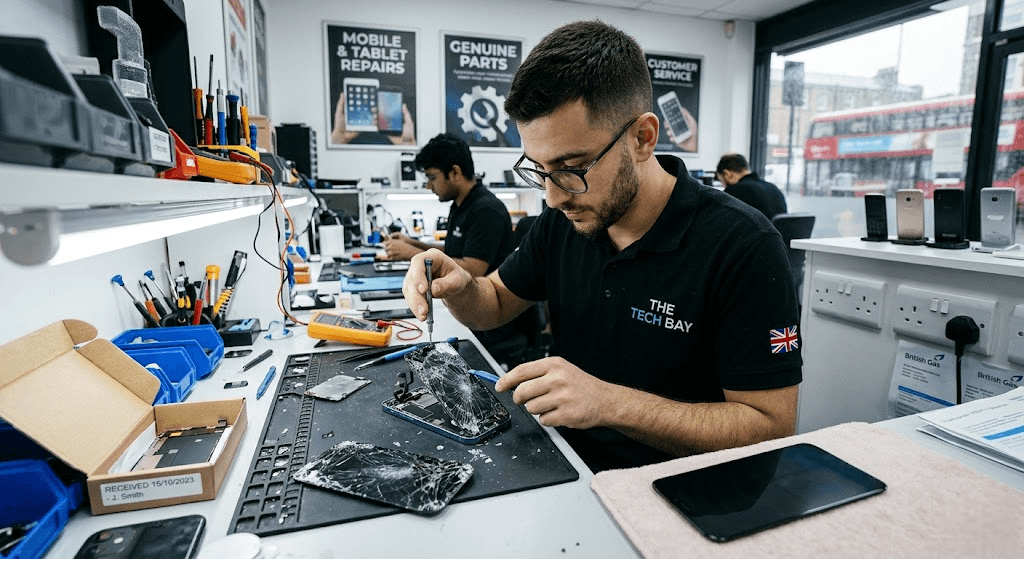
Every British town centre has at least one—and usually four—independent device repair shops. The appeal here is speed and cost; they will often turn a phone around in an hour for half the price of the manufacturer.
However, entering an independent shop is an exercise in conscious risk. Because Apple, Samsung, and Google do not freely sell their premium raw parts to non-accredited vendors, independent shops rely on a massive global aftermarket supply chain. If you choose this route, you must interrogate the technician about what *tier* of screen they are about to fit into your device.
3. The DIY Route
Spurred by the growing global “Right to Repair” movement, companies like iFixit—and more recently, Apple and Samsung’s own self-service stores—allow UK consumers to buy the genuine replacement modules and the tools required to do it at home.
While conceptually romantic, DIY screen replacement on a modern smartphone is not for the faint-hearted. It involves dealing with microscopic pentalobe screws that strip instantly if looked at wrongly, using a heat gun to soften stubborn industrial adhesives, and manipulating delicate ribbon cables that tear with the slightest twitch of a plastic spudger. Unless you possess the steady hands of a vascular surgeon and an extreme surplus of patience, the DIY route often ends in a device that is more broken than when it started.
The Parts Jargon: Demystifying the Aftermarket
If you opt for an independent repair shop, you will likely be offered a choice of price points. Knowing what sits behind these industry terms can save you from months of visual frustration.
Refurbished Original (The “Pulled” Screen)
This is the absolute best-case scenario in the non-official world. This is a genuine, original manufacturer display taken from a dead phone (e.g., one with a fried motherboard), or an original display that had its top glass successfully shaved off and re-laminated. It will retain the correct colour accuracy, refresh rate, and touch sensitivity of your original device.
Soft OLED
Modern flagship screens are built on a flexible plastic substrate, which allows them to curve slightly at the bezels and absorb the shock of an impact. Third-party “Soft OLEDs” replicate this exact build. They are slightly more expensive than basic copies, but offer great colour saturation and are much less likely to shatter the next time you drop the device.
Hard OLED
To cut manufacturing costs, third-party factories produce OLED screens built on a rigid, hard glass substrate rather than flexible plastic. While the picture quality is generally acceptable, hard OLEDs have a fatal flaw: they cannot flex. If you put a phone with a Hard OLED into your tight denim pocket and sit down awkwardly, the internal glass substrate can snap, instantly killing the display while leaving the top cover glass completely unmarked.
In-Cell LCD
The bottom of the barrel. If you are quoted £45 to fix an iPhone 13 screen, you are getting an In-Cell LCD. This involves ripping out the advanced OLED technology and replacing it with an old-school backlit LCD panel. The consequences are immediate: your battery life will plummet because the phone has to power a backlight; your true, deep pitch-blacks will turn into a washed-out, glowing dark grey; and the physical screen assembly is often so thick that it sits proud of the phone’s metal frame.
The Software Trap: “Parts Pairing”
In recent years, the replacement of a physical piece of glass has been transformed into a fierce software battleground. Manufacturers—most notably Apple—utilise a practice known as “serialisation” or parts pairing.
Inside the tiny ribbon cable of a modern smartphone display sits a microchip carrying a unique cryptographic serial number. When the phone boots up, the main logic board checks this serial number against its secure enclave. If you take the genuine, flawless OLED screen off a brand-new iPhone in a shop and place it onto another identical iPhone, the second phone will flag an **”Important Display Message”** on the lock screen, warning the user that the part cannot be verified.
Historically, this also disabled helpful features like *True Tone* (which adjusts screen warmth to ambient room lighting) or battery health readouts. While public and legislative backlash is slowly forcing manufacturers to wind back some of these software locks, a consumer opting for a third-party repair in 2026 must accept that their device’s settings menu may permanently carry a digital scar noting that it has been operated on.
The Pre-Repair Handover Protocol
Handing your smartphone over to a stranger behind a counter is a massive act of digital vulnerability. Your device holds your banking apps, your saved passwords, your personal correspondence, and your photo library. Never hand over a device blindly. Follow this strict protocol:
- Back it up: Before you walk out the door, trigger a manual, hard backup to iCloud, Google Drive, or a local PC. If the repair technician accidentally shorts the logic board during the screen swap, your data goes to the grave with it.
- Engage Repair Mode: Both Samsung (*Maintenance Mode*) and Google (*Repair Mode*) offer built-in software toggles that lock away your personal data, photos, and messages behind an encrypted wall while leaving the core diagnostic functions of the phone open for the technician to test the touch digitiser. If you use an iPhone, update to the latest iOS to utilise Apple’s *Repair State*.
- Never give out your master PIN: If your device is too old to support a dedicated Repair Mode, wipe the phone entirely before handing it over, or sit physically in the shop while they test the display in front of you. A legitimate technician does not need access to your WhatsApp messages to verify that the letter ‘Q’ on the keyboard works.
The Economics: When to Walk Away
There comes a point in every older device’s lifespan where a screen replacement ceases to be an investment and becomes an economic fallacy. A simple rule of thumb utilized by the second-hand market is the **50% threshold**.
Look up your exact device, in its current storage configuration, on a reputable UK second-hand retailer like CeX or eBay (filtering by ‘Sold Items’). If the cost of the screen replacement is greater than 50% of the cost of buying an uncracked, second-hand replacement unit of the same model, do not fix it.
Instead, sell your broken device online as “Spares or Repairs.” The global market for damaged logic boards, genuine camera modules, and haptic motors is massive; the money you make from selling the carcass, combined with the money you saved by not paying for the screen repair, will almost always buy you a vastly superior, refurbished handset.
Don’t Forget Your Hidden Insurance
Before you tap your debit card at a repair kiosk, sit down and check your existing financial paperwork. Millions of UK consumers pay for screen repairs out of pocket while actively paying for insurance policies that cover them.
Check your **packaged bank account** (such as a Nationwide FlexPlus, Club Lloyds, or Monzo Premium account). These accounts routinely bundle comprehensive worldwide family gadget insurance into their monthly fees. While you will still have to pay an excess—usually between £25 and £50—the insurer will arrange for a courier to collect the device, have it repaired at an accredited facility using genuine OEM parts, and return it to your door.
Similarly, check your standard Home Contents insurance. If you have “Accidental Damage away from the home” checked as an add-on, a £300 phone repair might cost you nothing more than a £50 excess and a ten-minute phone call.
The Post-Repair Inspection: The Five-Point Test
When the technician slides your resurrected device back across the counter, do not simply say thank you and put it in your pocket. Perform a rigorous, five-point diagnostic check before leaving the premises:
- The Polarised Sunglasses Test: Put on a pair of polarised sunglasses and look at the screen, rotating the phone 360 degrees. Cheap aftermarket LCD panels have poorly aligned polarising filters; at certain angles, the screen will turn completely pitch black to your eyes.
- The Icon Drag: Press and hold an app icon until it jiggles. Slowly and methodically drag that icon into every single corner, edge, and central sector of the glass. If the icon suddenly drops out of your grip and snaps back to the grid, you have just found a dead zone in the new digitiser.
- The Sensor Check: Make a standard phone call and lift the handset to your ear. Does the screen instantly go black? If not, the technician has misaligned or damaged your ambient light/proximity sensor during the transfer.
- The White Page Test: Open a blank, pure white web page and turn the brightness to 100%. Look around the extreme edges of the frame. Do you see pale, yellowy-white spotlights shining up from the bottom? That is “backlight bleed,” a sure sign of a badly fitted or low-tier LCD panel.
- The Frame Squeeze: Run your thumb gently around the seam where the glass meets the metal chassis. It should be entirely flush. If your fingernail catches, or if the glass bows inward when pressed, the technician has skimped on the internal adhesive. Within three weeks, dust will slip through that gap and destroy the front-facing camera.
Ultimately, a replacement screen is a compromise with gravity. By knowing the technology inside your device, demanding transparency regarding the origins of the replacement parts, and locking down your personal data, you can ensure that a momentary lapse in digital dexterity doesn’t turn into a permanent technological headache.